MCP Server connect SeekTable to your AI agent
The SeekTable MCP server allows AI clients to connect to your SeekTable account (preserving all permissions of that account). Think of it as a natural language bridge to your BI. AI agents interact with your data cubes and schemas the same way a human uses the report builder, enabling secure, agentic analysis of real-time business data.
Why use SeekTable MCP
Given that ChatGPT/Claude support CSV uploads and can connect to databases via direct MCP to query via SQL, you may ask: what makes SeekTable MCP the better choice?
It's the same reason you use a BI tool instead of a spreadsheet:
- Data governance: AI agents are not allowed to execute raw SQL queries or access arbitrary tables and rows. They can only access the data the user is already authorized to see via the report builder UI.
- Single source of truth: The semantic layer allows the agent to operate with already defined dimensions and measures, guaranteeing that calculations are correct and easily verifiable. All users access the same data models (cubes), so they just cannot calculate metrics differently. Users can jump from the chat to an ad-hoc report to confirm the chatbot's figures are 100% correct.
- Performance: efficient caching minimizes direct data source hits, offloading heavy processing and maintaining high system speed during AI interactions.
- Reliable answers: SeekTable MCP tools are optimized specifically for AI agents, reducing token consumption and minimizing "thinking time" for faster, more cost-effective results. It is well known that frontier models can provide powerful data analysis, but SeekTable MCP even works well with small, locally hosted models. This is a game-changer for handling sensitive data when cloud LLMs are not an option.
By using a BI tool, users can continue to rely on classic reports and the UI for repetitive queries and data exports. This approach offers the best of both worlds: the power of AI coupled with the reliability of traditional reporting.
Connect to MCP server
Get your API key in the SeekTable app: Manage Account → Get API Key.
- Go to Customize → Connectors (claude.ai/customize/connectors).
- Click + → Add custom connector.
If you don't see the + button, you might be using an organization Claude subscription. In this case, please contact your Claude Team administrator and ask him to add the SeekTable MCP via Organization settings. Alternatively, you can use an individual free-plan account to test SeekTable's MCP. - Enter:
- Name:
SeekTable BI tool - URL:
https://www.seektable.com/api/mcp
- Name:
- Click "Connect".
-
You'll be redirected to SeekTable form that asks for your API key:
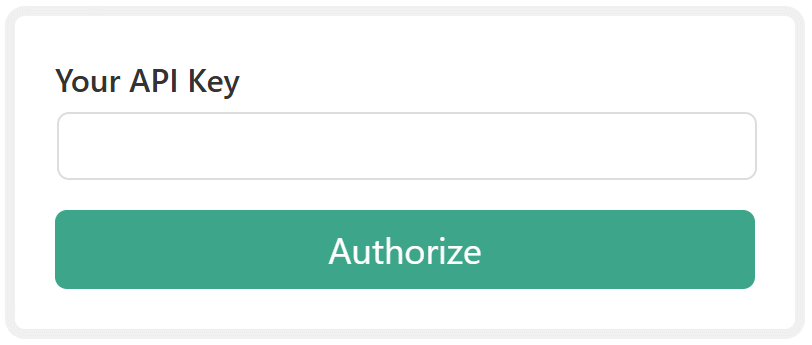
If you are already logged in, click "Get this account API key" to automatically fill this field. - Click Authorize
- Test the MCP server by asking Claude to count your cubes or reports.
If you use Claude Code (CLI), please follow instructions for self-hosted AI agents.
- In ChatGPT, go to Settings → Apps & Connectors → Advanced settings and enable Developer mode.
- Within the Connectors section, click Create.
- Configure MCP server details:
- Name:
SeekTable BI tool - Connector URL:
https://www.seektable.com/api/mcp - Authentication: Select OAuth
- Check the "I trust this application" box
- Name:
- Click Create
- You'll be redirected to SeekTable form that asks for your API key:
If you are already logged in, click "Get this account API key" to automatically fill this field. - Click Authorize
- Test the MCP server by asking ChatGPT to count your cubes or reports.
If you use Codex, please follow instructions for self-hosted AI agents.
- In Antigravity, go to Settings → Customizations and click Open MCP.
- Edit
mcp_config.jsonfile and add to the "mcpServers" section:"seektable-demo": { "headers": { "Authorization": "<your_api_key>" }, "serverUrl": "https://www.seektable.com/api/mcp" } - Restart Antigravity. Go to Settings → Customizations and ensure that in the "Installed MCP servers" seektable is green.
- Test the MCP server by asking Antigravity to count your cubes or reports.
- MCP server URL:
https://www.seektable.com/api/mcp - Authentication method:: HTTP header
Authorization: <your_api_key>
- Claude Code: Add a remote HTTP server
claude mcp add --transport http seektable https://www.seektable.com/api/mcp --header "Authorization: <your_api_key>"
- Codex: Configure with config.toml → Streamable HTTP servers
Don't forget to initialize $SEEKTABLE_API_KEY environment variable with your API key before starting Codex:codex mcp add seektable --url https://www.seektable.com/api/mcp --bearer-token-env-var $SEEKTABLE_API_KEY
- Gemini CLI: Configure the MCP server in settings.json
gemini mcp add --transport http seektable https://www.seektable.com/api/mcp --header "Authorization: Bearer <your_api_key>"
- Opencode: MCP Servers → Remote
opencode.jsonfile in your project root:{ "$schema": "https://opencode.ai/config.json", "mcp": { "seektable": { "type": "remote", "url": "https://www.seektable.com/api/mcp", "enabled": true, "headers": { "Authorization": "Bearer <your_api_key>" } } } }
What to prompt
- If you're not familiar with cubes you have access to (they're shared or this is just a CSV file)
you can ask an agent to perform data discovery for you:
what insights I can get from my cubes
what insights I can get from "<cube_name_keyword>" cube
- If the dataset contains date column:
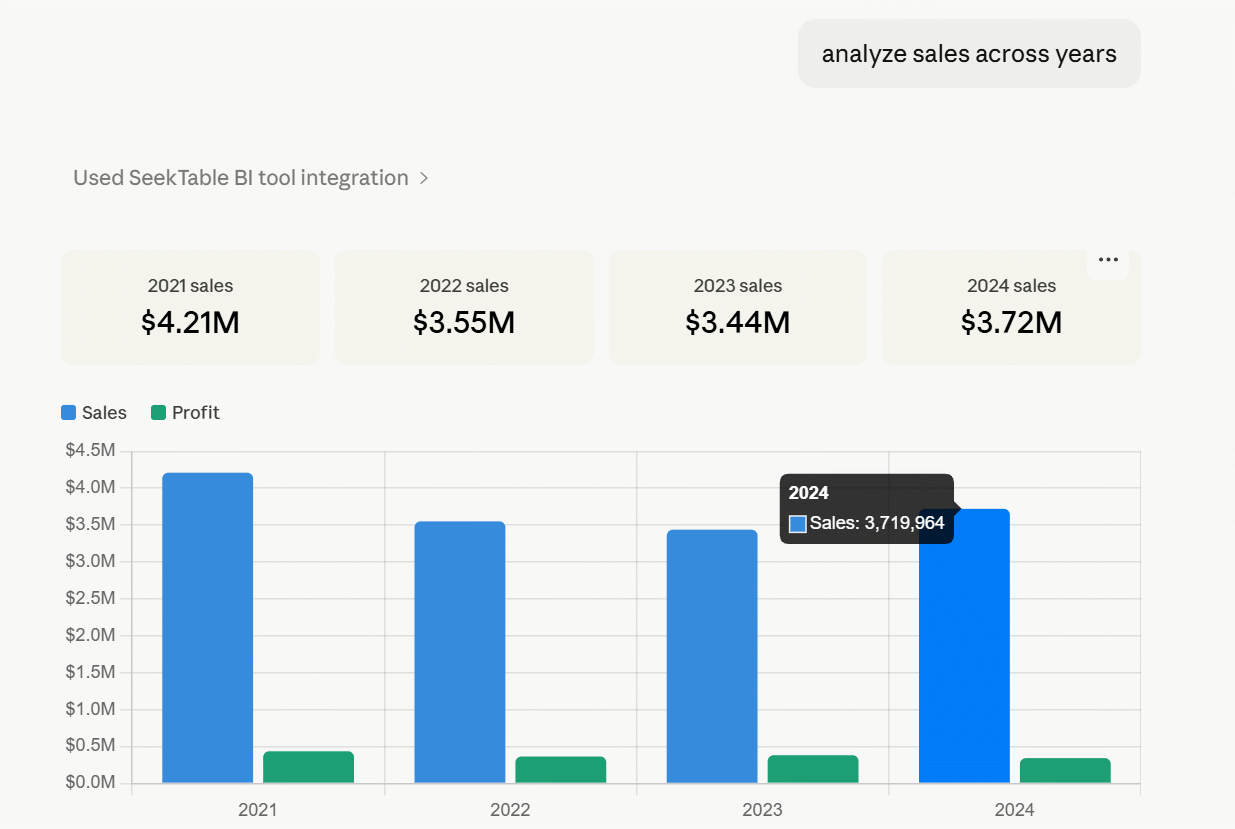
analyze <cube_name_keyword> across years
analyze <cube_name_keyword> this year by <dimension_keyword>
- Don't forget that an agent can do supplementary queries to get more details:
what contributes to <data_point_reference> most?
explain the decline/grows in sales in <month_or_year>
-
Results/numbers verification:
show report
The agent provides a SeekTable report link to verify the chat's data in the app.
Alternatively, you can ask for the link(s) in the main prompt:last year's sales by category + report link
Don't afraid to experiment; you're limited only by your imagination. Remember that your AI agent can get only numbers that you can get manually via SeekTable's reports builder.
MCP Tools MCP server capabilities
You don't need to mention these tools in your prompts as an AI agent automatically gets an instructions how to use them. Typical workflows:
- Ad-hoc questions or analysis:
list_cubes→get_cube_members→query_raw/query_aggregate - Existing report analysis:
list_reports→get_report_config→export_report_to_json - Creating an AI-generated dashboard HTML template: the same tools as for ad-hoc analysis + special prompt instructions to convert
query_raw/query_aggregatetool calls into<Widget:Report>/<Widget:Parameter>tags.
| Tool | Description |
|---|---|
list_cubes |
List / search available BI cubes (datasets). Used to find a cube ID before querying. |
get_cube_members |
Return details of a cube: its columns, dimensions, measures, and parameters. Needed to build valid queries. |
load_cube_parameter_dropdown_values |
Fetch all possible values for a dropdown parameter of a cube (supports dependent/cascading parameters). |
query_raw |
Query a cube for raw (non-aggregated) rows with optional filtering, sorting, and row limit. The MCP server utilizes a structured JSON query format rather than raw SQL. Parameterized execution is used for all values, eliminating the risk of SQL injection. |
query_aggregate |
Query a cube for aggregated data grouped by dimensions and measures, with optional filters and sorting. The MCP server utilizes a structured JSON query format rather than raw SQL. Parameterized execution is used for all values, eliminating the risk of SQL injection. |
list_reports |
List / search saved reports in the account; optionally filter by cube ID or name keyword to get report IDs. |
get_report_config |
Retrieve the full JSON configuration of a saved report — its columns, dimensions, measures, filters, and parameters. |
export_report_to_json |
Export the data of a saved report as JSON for further analysis or processing. |